Use Case

Automated CRM Pipeline Routing, Deal Stage Management & Team Handoffs

Automated CRM pipeline management with intelligent deal routing, stage monitoring, team handoffs, notifications, and seamless integrations with Zendesk, QuickBooks, and business systems.

Retool logo next to a badge labeled Agency Partner with a blue checkmark.
Case Study
Deal Automation
Industry
AI & Automation
Platform
Retool
Type
Business Automation

Business Outcomes

Automated task and lead creation from incoming email contacts

Eliminated manual searching for existing contacts before follow-up

Reduced missed follow-ups on incoming sales emails

Kept contact records updated automatically as new emails arrived

Problem Statement

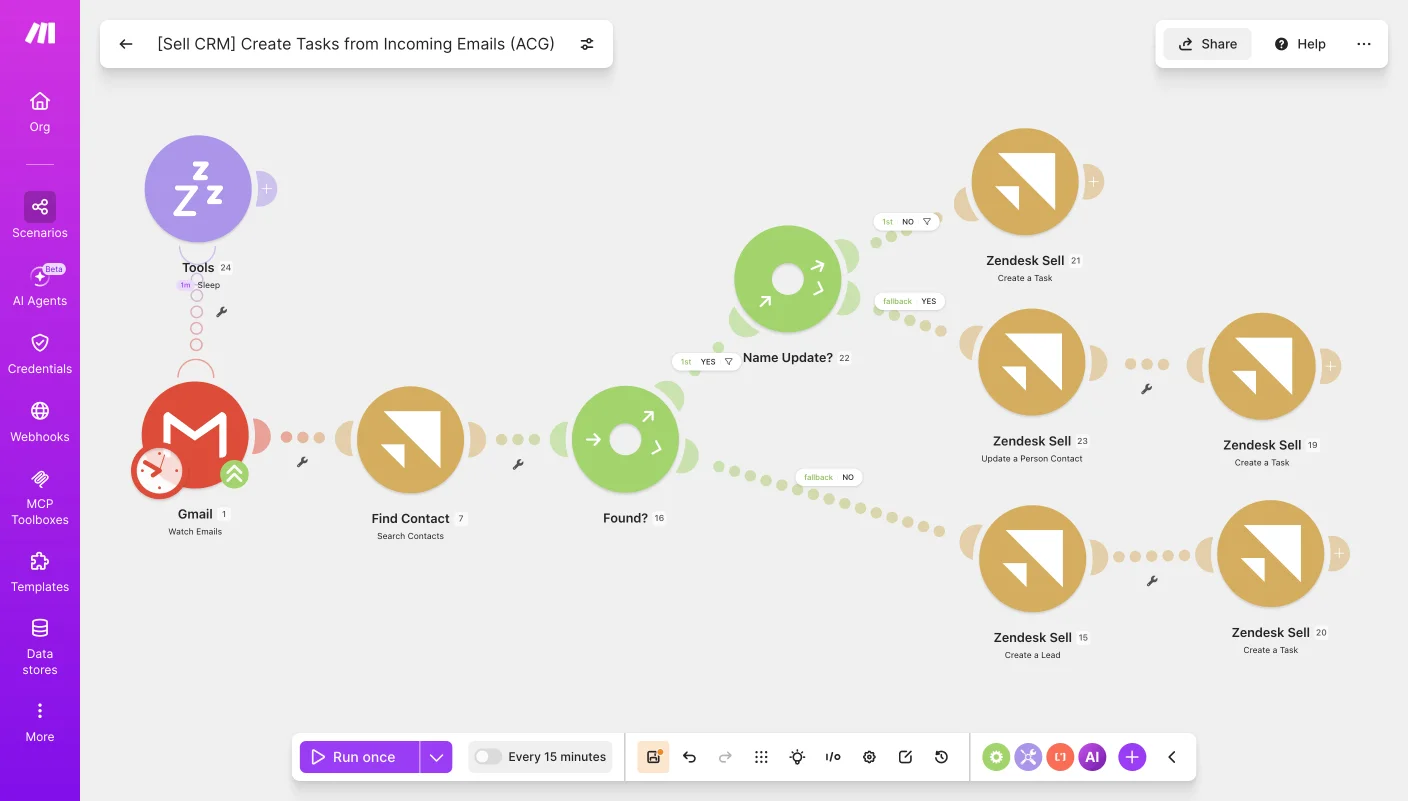
This automation was built for a sales team that needed a consistent way to turn incoming emails into follow-up tasks in their CRM without manually checking each message and creating records by hand. Before this, someone had to read incoming emails, search for the matching contact, and decide whether to create a new lead or update an existing one, which was slow and easy to fall behind on during busy periods. Now the system watches the inbox, checks whether the sender already exists as a contact, and automatically creates the right task or lead in Zendesk Sell based on what it finds.

Solution Design

The workflow starts by watching Gmail for incoming emails, then searches Zendesk Sell to see if the sender already exists as a contact. If a match is found, the flow checks whether the contact's name needs updating and either updates the person's details or creates a new task, depending on that outcome. If no contact is found at all, the system creates a new lead instead, and a short delay is built in near the start to help pace the process and avoid overlapping runs.

Business Outcomes

Automated deal handoff from AML approval to the payment team

Eliminated manual vendor checks in QuickBooks at each handoff

Reduced delays between AML approval and payment processing

Kept a clear vendor match record across both ownership paths

Problem Statement

This automation was built for a sales operations team that needed a reliable way to move deals through AML approval and into payment handling without someone manually tracking stage changes and checking QuickBooks for the right vendor each time. Before this, once a deal was approved through AML, moving it to the payment team and confirming the correct vendor existed in QuickBooks meant several manual handoffs, which slowed things down and made it easy for a deal to stall between stages. Now the system watches for stage changes in Zendesk Sell, routes deals based on ownership once AML is approved, and checks QuickBooks to confirm the right vendor exists before logging the result.

Solution Design

The workflow starts by watching for deals entering a new stage in Zendesk Sell, then checks whether the stage reflects AML approval before routing the deal toward the payment team. Once a deal is approved, it's routed again based on ownership, either ACG or Haytch, and QuickBooks is searched to confirm whether a matching vendor already exists. If a vendor is found, QuickBooks is updated accordingly; if not, the flow logs the result to Google Sheets instead, keeping a clear record of vendor matches for both ownership paths.

Business Outcomes

Continuously monitored the pipeline for deals entering AML status

Eliminated manual pipeline checks throughout the day

Reduced delays before billing and compliance follow-up began

Added retry and error handling to keep monitoring running reliably

Problem Statement

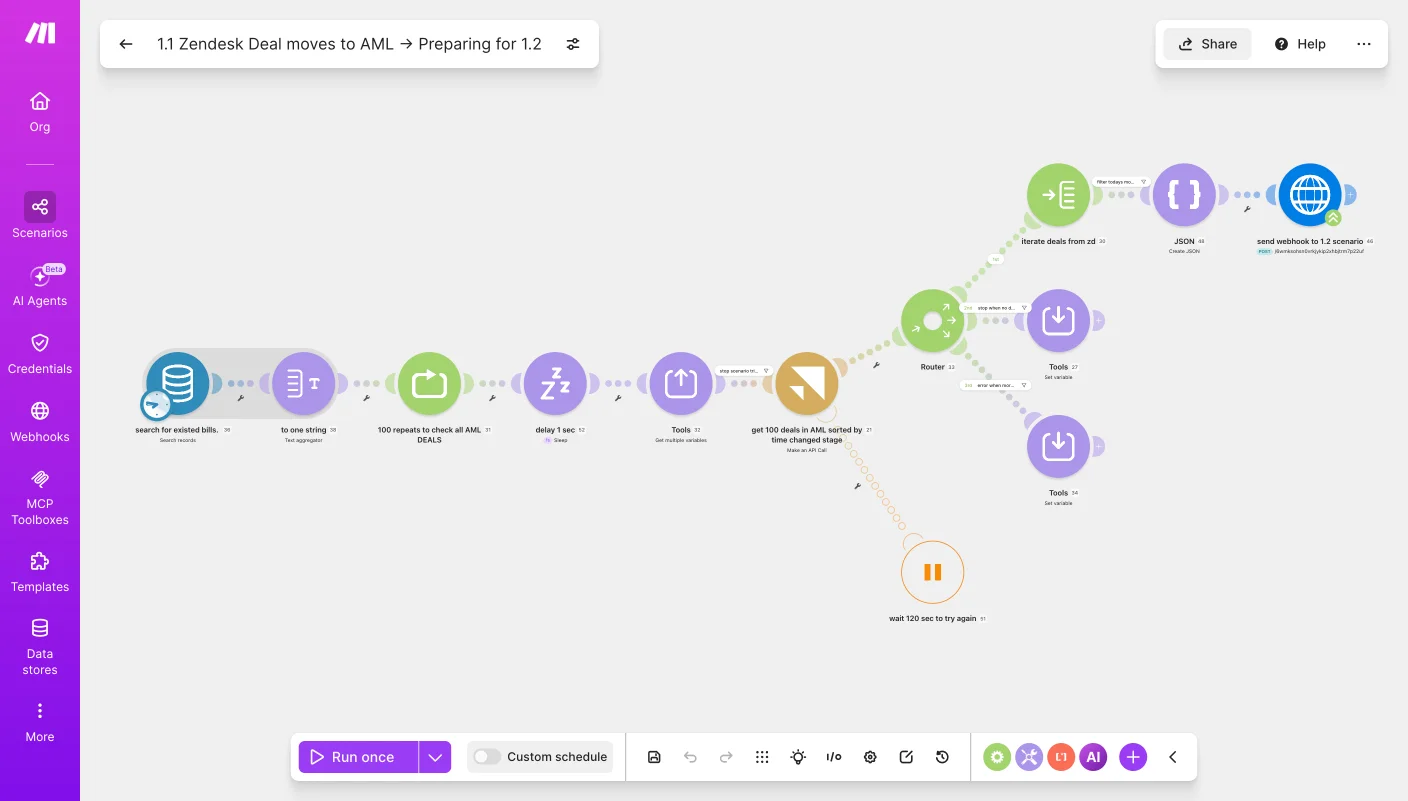
This automation was built for a sales operations team that needed a reliable way to catch every deal moving into AML status without relying on someone to keep refreshing the pipeline throughout the day. Before this, deals entering AML review could sit unnoticed for a while before anyone realized they needed billing and compliance follow-up, since checking for stage changes wasn't something a person could do continuously. Now the system checks repeatedly throughout the day for deals in AML, sorted by how recently they changed stage, and automatically hands each one off to the next stage of the process for billing and notification.

Solution Design

The workflow starts by checking for existing bills to avoid duplicate work, then loops through up to 100 checks with a short delay between each pass, continuously scanning for deals that have moved into AML status. It pulls the deals sorted by when they last changed stage, and a router decides whether to keep checking, stop the scenario, or handle an error and wait before retrying. Once a qualifying deal is found, the details are pulled, converted into JSON, and sent through a webhook to trigger the next scenario, which handles the actual billing and notification steps.
Digital Marketing
Streamline analytics with automated Klaviyo data extraction and custom reporting, empowering marketing teams to optimize campaigns and drive smarter growth strategies.
Read moreIkonik Icon
AI & Automation
Automated invoicing, payment reminders, collections, CRM updates, and SMS notifications with an AI-powered QuickBooks accounts receivable workflow.
Read moreIkonik Icon
AI & Automation
Unified reporting across multiple SaaS platforms with automated workflows that generate, consolidate, and deliver daily business reports without manual effort.
Read moreIkonik Icon
We are here to help you

Are you ready to optimize efficiency and drive growth?
Get in touch today.

Book My Operational Audit
graph of growthgross volume
retool-table
Contact
LinkedInYouTubeconnect@retoolpro.com
© 2026 RetoolPro Pvt Ltd.
Privacy Policy